Portant vs S-Docs

S-Docs is for Salesforce. Portant is the HubSpot equivalent.

S-Docs is a powerful document tool — but it’s built exclusively for Salesforce and doesn’t connect to HubSpot. Portant is the HubSpot equivalent: native CRM document generation, Google and Microsoft templates, and every document saved as a HubSpot record.

Portant and S-Docs comparison illustration

Key differences

Three reasons HubSpot teams choose Portant

The fundamental difference between Portant and S-Docs is not features — it is which CRM they live inside. S-Docs is Salesforce-only. Portant is HubSpot-native.

S-Docs has no HubSpot integration — at all

Portant

Portant runs natively inside HubSpot as a certified app. Generate, send, and track documents without switching tabs or platforms.

S-Docs

S-Docs is Salesforce-native and requires Salesforce to function. It has no HubSpot integration — not on any plan. HubSpot teams cannot use S-Docs.

Use your own Google and Microsoft templates

Portant

Use your existing templates in Google Docs, Slides, Word, PowerPoint, or PDF. Your formatting, branding, and layout stay exactly as they are.

S-Docs

S-Docs uses Salesforce merge fields and templates built within the Salesforce ecosystem. These templates do not carry over to HubSpot workflows.

Documents saved as HubSpot records

Portant

Every document Portant creates is saved back to HubSpot as its own record. Track status, report on documents, and follow up from within the CRM.

S-Docs

S-Docs stores documents within Salesforce records. Documents cannot be tracked, reported on, or followed up from HubSpot because there is no connection.

Feature comparison

Portant vs S-Docs, feature by feature

A direct comparison for HubSpot teams evaluating both tools.

Feature Portant S-Docs
HubSpot native integration Runs inside HubSpot as a certified app Certified HubSpot app Salesforce-only, no HubSpot integration on any plan
Works without Salesforce Standalone or HubSpot-only teams No Salesforce required Requires active Salesforce org
Google Docs / Slides templates Use existing Google Workspace templates All formats supported Salesforce merge fields only
eSignatures Built-in multi-signatory support Built-in, unlimited on paid plans Built-in, Salesforce-only
Free plan available Get started without a credit card 30 credits/month, no card required No free plan; per-user paid plans only
Documents as CRM records Every document saved as a native CRM object Every document is a HubSpot record Stored on Salesforce records
Approval workflows Sequential approvals with one-click approve/reject All paid plans Via Salesforce approval processes
Automation triggers Trigger on deal stage, form submit, or workflow Native HubSpot workflow triggers Via Salesforce Process Builder / Flows only
Flat pricing (not per-user) One price for the whole team $42/mo for full access Per-user pricing; also requires Salesforce licenses
Conditional content logic Show/hide sections based on CRM data Full HubSpot-driven logic Salesforce-driven conditional logic
Fully supported Partial / limited Not available

Why Portant

HubSpot-native document automation, end to end

Portant is the HubSpot-certified document app: generate, personalize, send, sign, and store quotes, proposals, and contracts from your own Google and Microsoft templates, with every document written back to the CRM as a real record.

Create any document straight from HubSpot

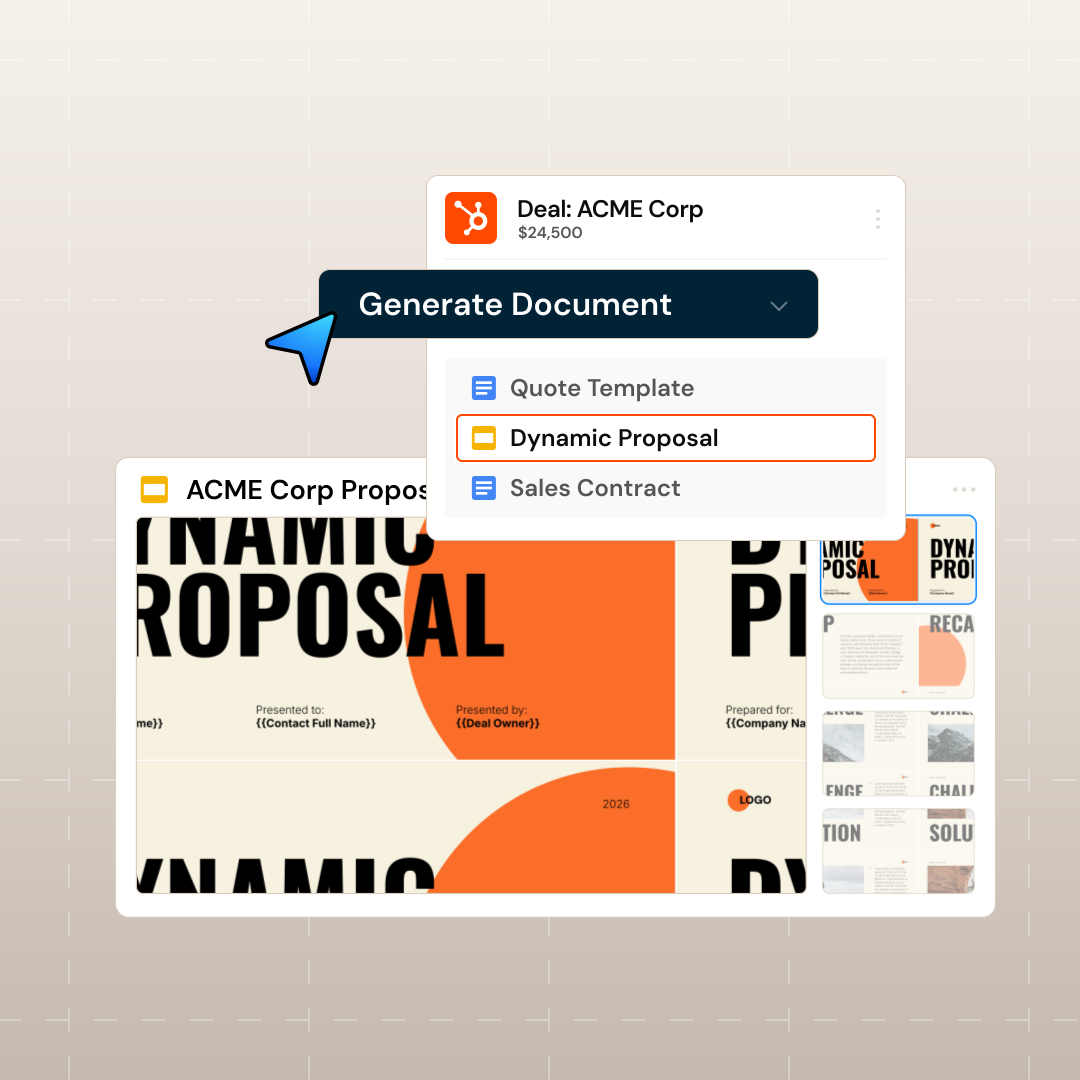
Generate personalized quotes, contracts and proposals using Google Docs, Slides, Microsoft Word, PowerPoint and PDFs—directly in HubSpot.

Edwin van der Maas

“With Portant, I run documents directly from HubSpot. No jumping between platforms. No copying data.”

Edwin van der Maas · Operations Lead, 2manydots

Generate any document from HubSpot

Personalize with HubSpot data, e-signatures & more

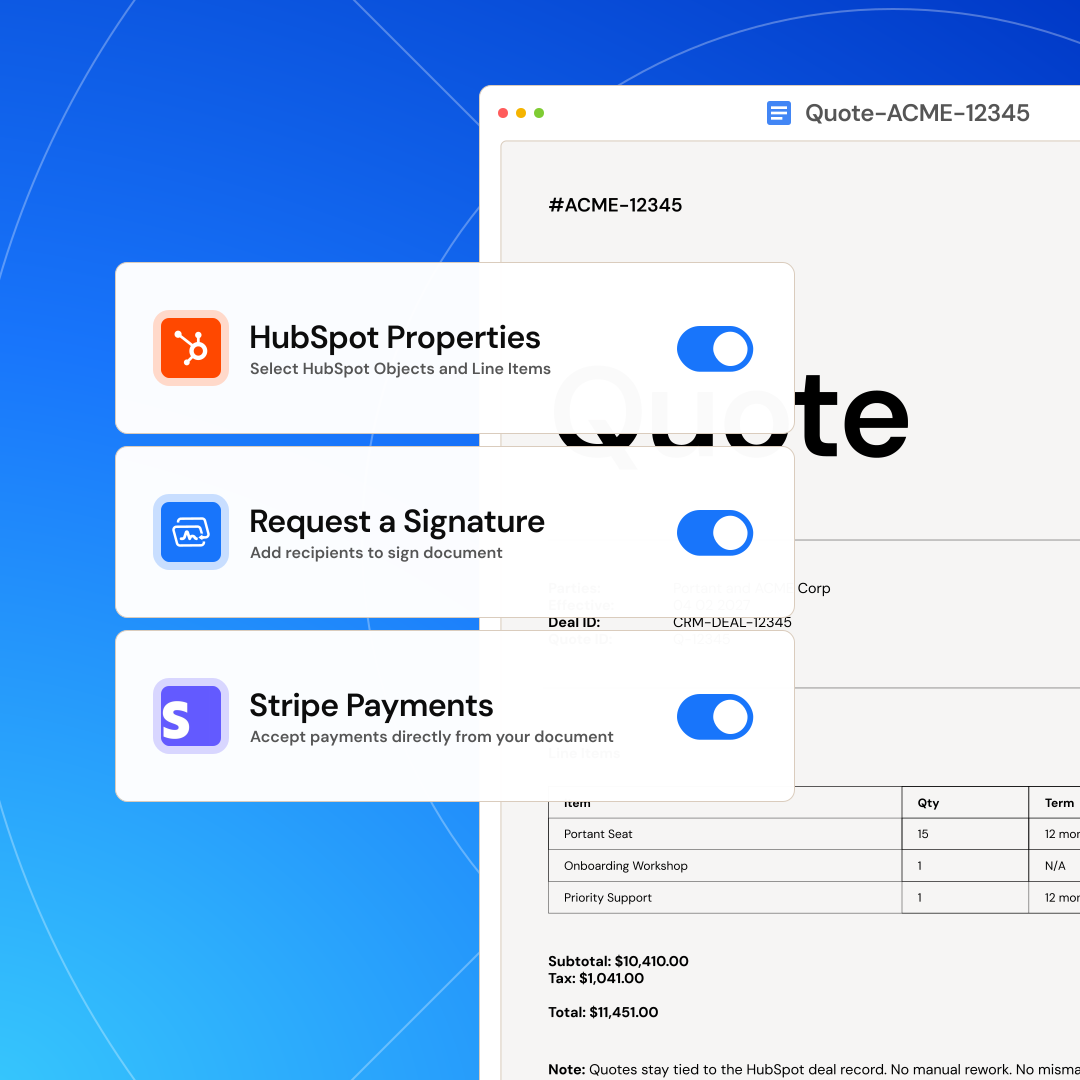
Design fully customized documents using any HubSpot data and line items, plus AI content, e-signatures, and Stripe payment links, all aligned with your brand.

Natalie Reeder

“At RepCard, Portant gave us an end-to-end automated workflow inside HubSpot, we replaced manual agreement creation at scale.”

Natalie Reeder · Revenue Operations, RepCard

Personalize with HubSpot data, e-signatures and more

Send, sign, and deliver with built-in approvals

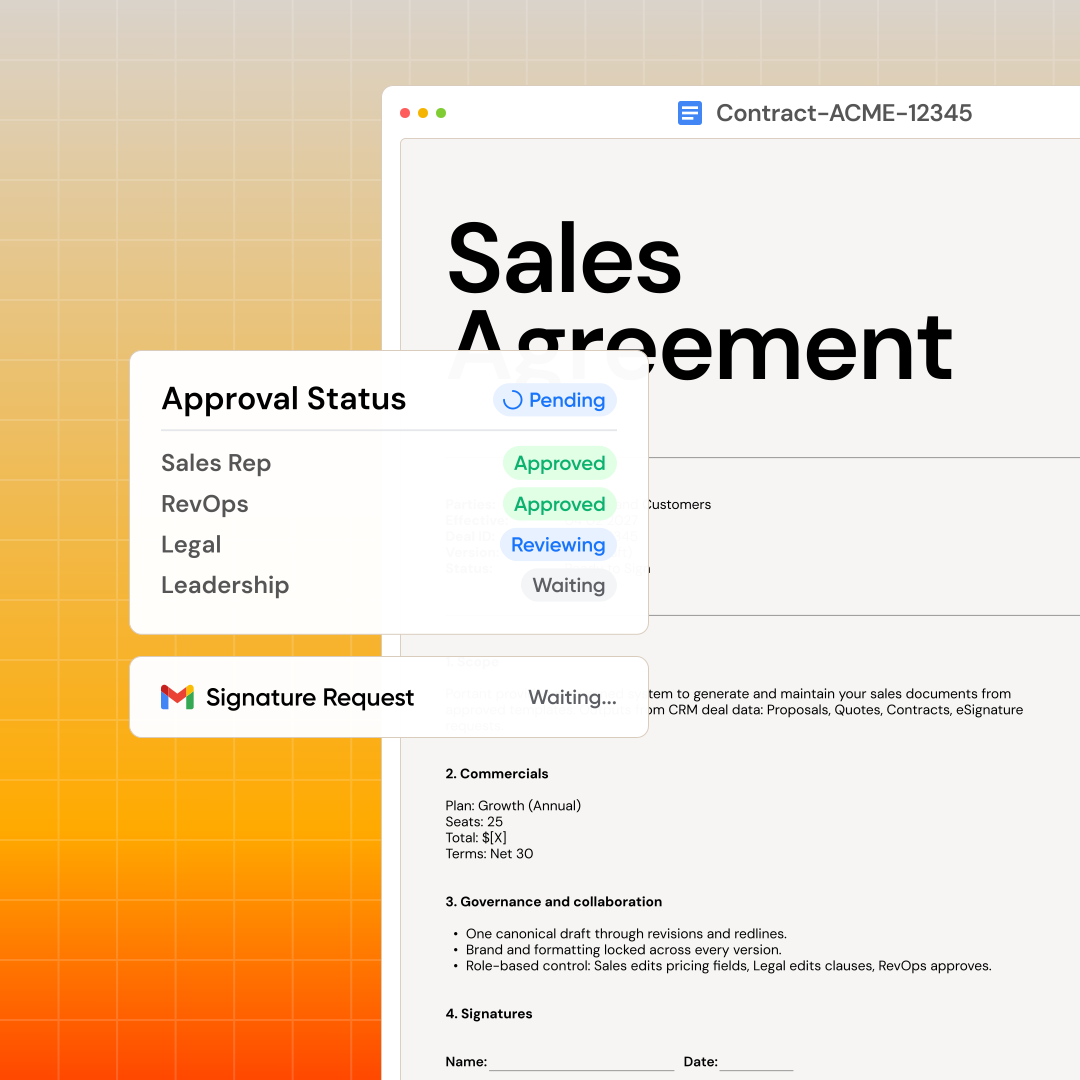
Create workflows that send, sign and save your documents automatically. Add a human in the loop and a review step for approvals and better team collaboration.

GrΓ©gory Fleurot

“Hundreds of contracts go out in a few clicks. The signed ones come back in, and the rest are easy to spot.”

GrΓ©gory Fleurot · Director of HR & Operations, Innovative Language

Send, sign and deliver with approvals

Sync and track everything in HubSpot

Every document gets its own HubSpot record with full status and history. Build reports to track views, status, and signatures in real time. Automatically sync files to Google Drive or OneDrive.

Megan Marohn

“When the executive team asks for an extension document, Portant gets it to them in about an hour, it’s empowered my whole team.”

Megan Marohn · Operations, Boomerang Capital

Sync and track everything in HubSpot

Pricing

Simple, transparent pricing

Prices below are annual billing (same as the default on our pricing page). Open full pricing to switch monthly or compare every feature.

Free

For individuals getting started

$0 /month

30 credits/month · 1 user

Get started
  • Document workflows
  • Template gallery
  • HubSpot integration
  • Single eSignature per doc
  • Chat and email support

Pro

For professionals who need more

$42 /month

billed annually

2,000 credits/month · 1 user

Try for free
  • Everything in Free
  • PDFs without Portant branding
  • Send emails from aliases
  • Auto-trigger from deals
  • Multiple eSignatures per doc
  • Conditional logic & line items
Most popular

Team

For teams sharing workflows

$125 /month

billed annually

5,000 credits/month · 5 users

Try for free
  • Everything in Pro
  • Shared workflows
  • Custom branded eSign portal
  • 5 users included (+$30/user)
  • Team admin panel
  • Approval workflows & priority support

Enterprise

Advanced security and support

Custom

Tailored to your needs

Contact sales
  • Everything in Team
  • Custom credit limits
  • Advanced security
  • Custom billing (PO/ACH/wire)
  • Dedicated account manager

S-Docs pricing for HubSpot teams

S-Docs pricing is per-user and requires an active Salesforce org. Because S-Docs cannot connect to HubSpot, any HubSpot team would also need to maintain Salesforce licenses — making the total cost of ownership significantly higher. S-Docs has no free plan.

What you pay Portant Team S-Docs
Document automation tool $125/mo flat Per-user (contact for pricing)
CRM license required HubSpot (any plan) Salesforce (required)
HubSpot integration Native, all plans None — not available
Free plan Yes — 30 credits/mo No

For any team running HubSpot, S-Docs is not a viable option — it requires Salesforce. Portant is built for HubSpot and starts free.

Why teams switch

Common reasons teams move from S-Docs to Portant

Moving from Salesforce to HubSpot

Teams that used S-Docs at a previous company with Salesforce often join organisations running HubSpot. S-Docs cannot follow them. Portant is the direct HubSpot equivalent — the same concept, the same familiar templates, built for the CRM they now use.

Keep existing Google and Microsoft templates

S-Docs uses Salesforce-specific merge templates that do not transfer to HubSpot. With Portant, bring your existing Google Docs, Slides, Word, or PowerPoint templates. Add HubSpot tags and start generating immediately — no rebuilding required.

Full visibility inside HubSpot

With S-Docs, document data lives inside Salesforce — inaccessible to HubSpot users. Portant saves every document as a HubSpot record, giving your team full visibility into document status, signing progress, and follow-ups without leaving the CRM.

See why teams choose Portant.

Hear it directly from our many happy customers.

Sam Clarke

Portant saved our sales team countless hours every week automating documents.

Sam Clarke

Co-Founder at Clipboard

HubSpot 5 stars

3,000+

App installs on the HubSpot Marketplace

G2 5 stars

4.9/5

Average review on G2, an independent review site

Portant

40K+

Teams have switched to Portant

We’re seeing higher average closed revenue with Portant and faster days to close, it’s showing us a material impact on sales velocity.

MB

Matthew B

Founder & Leadership, Upflowy

Meet the teams levelling up with Portant.

Portant has been a game-changer for Clipboard! It’s saved our sales team countless hours every week by generating order forms, proposals and contracts with info from HubSpot automatically filled in.

SC

Sam Clarke

Co-Founder, Clipboard

With Portant, I run documents directly from HubSpot. No jumping between platforms. No copying data.

EM

Edwin van der Maas

Operations Lead, 2manydots

Portant replaced three separate tools for us. One platform handles docs, signatures, and follow-ups without leaving HubSpot.

RK

Rachel K

RevOps Manager, Mid-Market

Hundreds of contracts go out in a few clicks. The signed ones come back in, and the rest are easy to spot.

GF

GrΓ©gory Fleurot

Director of HR & Operations, Innovative Language

At RepCard, Portant gave us an end-to-end automated workflow inside HubSpot, we replaced manual agreement creation at scale.

NR

Natalie Reeder

Revenue Operations, RepCard

We’re seeing higher average closed revenue with Portant and faster days to close, it’s showing us a material impact on sales velocity.

TP

Tom P

VP Sales, Enterprise SaaS

Love this product. Have been using it for over a year and the integration to Google Workspace is awesome. Lots of credit for listening to your users!

DI

Duncan I

Web, Google & WordPress

When the executive team asks for an extension document, Portant gets it to them in about an hour, it’s empowered my whole team.

MM

Megan Marohn

Operations, Boomerang Capital

Truly a gamechanger! Portant streamlines these tasks and allows me to focus on the things that require my attention and problem-solving!

JH

Jordan H

Administrator, Mid-Market

This software brilliantly takes over the tedious process of creating and sending invoices. This not only saves time but massively reduces errors of data entry.

LG

Lukas G

E-commerce Business Owner

This product is a gamechanger for all of those painful manual document merges. Love what you and the team have built!

MB

Matthew B

Founder & Leadership, Upflowy

Our reps used to spend 30 minutes per proposal. Now it’s under two minutes and the documents look better than ever.

JS

James S

Sales Director, Agency

FAQs

Frequently asked questions

Common questions about S-Docs, HubSpot compatibility, and switching to Portant.

No. S-Docs is a Salesforce-native application and requires Salesforce CRM to function. It has no HubSpot integration. If your team uses HubSpot as its CRM, S-Docs is not a viable option — you need a HubSpot-native tool like Portant.
Yes. Portant is the HubSpot-native equivalent of S-Docs. Both tools generate documents from CRM data using your own templates. S-Docs does this inside Salesforce; Portant does it inside HubSpot, with every document saved as a HubSpot record and every action taken without leaving the CRM.
S-Docs uses Salesforce-based merge templates built inside the Salesforce ecosystem. Portant works with Google Docs, Google Slides, Microsoft Word, PowerPoint, and PDF files — templates your team likely already has. Add HubSpot merge tags to your existing files and start generating documents immediately.
Yes. Portant includes built-in eSignatures with multi-signatory support, sequential or parallel signing, branded signing portals, and full audit trails. eSignatures are included on all paid plans at no additional per-signature cost.
S-Docs pricing is per-user and Salesforce-only — meaning your team also pays for Salesforce licenses on top. Portant starts free and its Team plan is $125/month flat for up to 5 users, billed annually. There are no Salesforce license requirements.
Most teams set up their first Portant workflow in under 10 minutes. Install Portant from the HubSpot Marketplace, connect your Google or Microsoft templates, add HubSpot merge tags, and generate your first document. Because you use your own templates rather than a proprietary editor, there is no lengthy migration process.

Stop formatting,
start closing.

Start your 7 day free trial

Join over 40,000 sales teams using Portant to close deals faster in HubSpot.